Showing posts with label new features. Show all posts

Wednesday, January 19, 2011

New recommendation panel for following people in your organization

One of the most important things when a new user joins an organization's Socialwok network is to follow existing users. We have come up with a new panel that a new user will see that recommends who he should follow. The new user has the choice of following people based on Google Contacts, following
people he has previously emailed or to follow all existing users in the domain.


If the new user chooses to follow based on his Google Contacts, Socialwok will use the new user's Google Contacts and recommends existing users who the new user has previously emailed.


Wednesday, January 5, 2011

Enter your user profile & have it be searchable in your organization

We are happy to announce that Socialwok users can now enter information about themselves (like address, title, background, education) as a user profile.  All user profile information are searchable by other members of the organization. See an example of a profile by one of our users Travis Johnston.

Organizations can use Socialwok as their company directory that is searchable and accessible over multiple devices like mobile, tablet etc! Let us know what you think of our user profile and how we can improve on it at support@socialwok.com

From Jan 2011 UI improvements

Tuesday, January 4, 2011

Editing of comments is now supported!

We are happy to announce that you can now edit any comments that you have posted. See the example below, you will see the "edit" option with every comment that you have posted. An edited comment will behave like a new comment and generate the relevant notifications (email & Google Talk IM). Check it out!

From Jan 2011 UI improvements

Friday, December 17, 2010

New profile page - see users and feeds you are following

We have been keeping busy and listening to our users. We have changed the profile page for a user to be more intuitive; the user can now see in a pictorial form which co-workers are following his or her and what feeds the user is following.

From Dec new UI changes

Friday, October 8, 2010

Embed Socialwok in any Google Site page

Do you use Google Sites as an internal organization information or announcement page? You can now create a powerful company community portal site in less than 5 mins with Socialwok and Google Sites. You can embed Socialwok Gmail gadget into any Google Site page and allow your users to get access to the full functionality of Socialwok from right into Google Sites


Steps to embedding the Socialwok widget in a Google Sites page. Try it today!
  1. Create a Google Site page. Edit the Google Site page.
  2. Click on Insert > More Gadgets > Add Gadget by url
  3. Enter gadget url -> http://app.socialwok.com/gadget.xml
  4. Customize the properties of the Socialwok gadget like width, height scroll bar etc.
  5. Save the Google Site page.
To see content in the Socialwok gadget, you need to be authenticated into your Google domain. Socialwok automatically detects that you are authenticated into your Google Apps domain or Google account and loads the authenticated Socialwok content.

Monday, June 14, 2010

Socialwok's Presentation at Google I/O & Picture Gallery Now Available!

Socialwok had a very busy May due to Google I/O, other events like Plato@50 anniversary, IIW 2010 (Internet Identity Workshop) and our travels in Silicon Valley. 
At Google I/O, we launched a version of Socialwok integrated with Google Buzz, Socialwok Desktop (Socialwok plugin for Seesmic Desktop 2). We also got a chance to participate in the Google IO Sandbox for AppEngine where we demoed Socialwok to other conference participants.

Here is a video of our own Ming Yong and Navin Kumar presenting our Socialwok offerings in Google Buzz in the panel, What's the hubbub about Google Buzz APIs?

Sunday, April 25, 2010

New feature: Email digest

We just rolled out a long overdue feature; email digest. Users can now get daily, weekly or biweekly email digest of their "Home" feed activity. By default, all users will receive weekly email digests. To change your email digest settings, click Settings > Notifications

To access your email digest preferences, click Settings > Notifications

Here is an example of email digest in Gmail

This is a beta feature and we welcome feedback or bug reports at our Socialwok group. Check out your Socialwok email digest today!

Tuesday, April 13, 2010

Our Social Media Suite now supports publishing to your Buzz profile!


Google just announced the launch of the Google Buzz buttons and Socialwok is one of the first web services to implement them. Our users can now publish their status updates from Socialwok to their Google Buzz profiles in one click! This functionality will be part of our Social Media Suite enabling our uses to do social media marketing on all the major social media services on the web; Facebook, Twitter, Linkedin and now Google Buzz. Check out our previous blog post on our social media publishing capabilities

Here is how we support the new Google Buzz buttons. I just posted a status message with a YouTube video link and want to share it in Google Buzz
A status message with a Youtube link. Click "Publish" to share it with other social media services

Socialwok now supports publishing status updates to your Buzz profile as well as Twitter, Facebook and Linkedin.

To publish to Google Buzz, click on the Google Buzz option to initiate a pop-up of the Buzz post

Successful publishing of the Socialwok status update to your Google Buzz profile

Want to try this new exciting addition to our Social Media Suite? Sign up for Socialwok right now at our website or our listing at the Google Apps Marketplace!

Sunday, April 4, 2010

New Features: Private Feeds, Multiple Domain, Image preview, Mentions in comments

We would like to thank all our users for giving us great feedback through Google Talk, Socialwok Group and email. To streamline the feedback giving process, we now have a feedback form where users can answer a short survey and help us improve Socialwok!

Today, we are happy to announce several exciting new features as a result of our users' feedback; Private Feeds, Multiple Domain login support for web & mobile, Image Previews as thumbnails, Mentions in comments.

Private feeds
In our company Socialwok network, I find myself wanting to keep certain discussions private from the interns we have hired. Previously, we had to use email. Now, I can create private feeds to keep these discussions confidential. The administrator of the private feed has to invite other users to be members of the private feed in order for those users to get access to the private messages. To create a private feed, click on the  button. The new feed setup wizard has a private option as a checkbox.


All private messages and feeds will be indicated by the lock icon as shown above.

Multiple domain support for web and mobile
Many of our users actually have multiple lives :-) or multiple Google Apps domains. One domain could be for work and another domain is for non-profit volunteer activities or family. In the past, our users had to use two separate browsers or login only to one domain at a time. That pain is now over! Socialwok supports logging into multiple domains in a single browser. So update your bookmarks! 


After logging in, you are now redirected to your very own domain restricted URL of socialwok. For example, for a Google Apps domain @voiceroute.net (the domain is 
voiceroute.net), it's http://app.socialwok.com/a/voiceroute.net/

For the mobile web version, it's 
http://app.socialwok.com/a/voiceroute.net/MobileSocialwok.html

After you log in, you can add a link to your iPhone's home screen right away, and it will be specific to your domain. For multiple domains, you can create as many as your want.

As for users of our Socialwok Gmail gadget, you don't have to worry. It will simply just work. Now if you log in to Socialwok using multiple Google Apps domains, you will get the gadget working in all your Gmail windows or tabs.


Image preview as thumbnails
One of the commonly requested features by our users is thumbnail preview of images shared. Socialwok now supports the thumbnail previews of image files attached to an update as well as from website links.

Socialwok provides a thumbnail gallery preview of all images grabbed from a website link posted in an update

Users can preview using thumbnail any attached image files for an update


Direct Mentions in Comments

Occasionally, my colleague Navin may post something very interesting that I would like to bring to the attention of Vikram or interns in the company. I can now comment on the update in question and mention Vikram or the "Intern" feed that all the interns are following. This commented update with mentions will appear in Vikram's home feed as well as in the "Intern" feed. Check it out!

Monday, February 1, 2010

Socialwok now supports publishing to LinkedIn on top of Facebook, Twitter!

We are on a roll! Since we rolled out the new user interface, we have been getting great reviews from users and got covered by Techcrunch for our Gmail integration. We are very excited to announce that Socialwok now supports publishing your status updates to Linkedin on top of our existing Facebook and Twitter support.

Original Socialwok status update to publish

Support for publishing to Twitter, Facebook and Linkedin


Published Status Update from Socialwok in Linkedin, Twitter and Facebook


Monday, January 25, 2010

Google Docs as your cloud based file store. Support for arbitrary file types

Google Docs now support arbitrary file type upload with quota of 250MB/file with total limit of 1GB for premier edition users of Google Apps. Google will be rolling this functionality out to standard edition shortly. We are very happy to announce that Socialwok users can now use Google Doc as their cloud based file storage service to store file types beyond the traditional file types for users with Google Apps premier edition domains.


Support for uploading unlimited file type and size limit of 250MB. Uploaded file "docs images.zip" to Google Docs


Support for uploading unlimited file type and size limit of 250MB. Uploaded file "docs images.zip" to Google Docs


List of files stored in Google Docs. "docs images.zip" has been successfully uploaded to Google Docs

Friday, January 22, 2010

Socialwok Gadget released for Gmail! Access Socialwok without leaving Gmail!

We work very closely with our users to get feedback on their use of Socialwok. The most commonly requested integration is with Google Mail (Gmail) as it is probably the most used application in Google Apps. We are happy to announce the production release of Socialwok gadget for Google Mail. You can now access all features of Socialwok without leaving Google Mail

Access all functions of Socialwok from within Gmail canvas using the Socialwok Gmail Gadget


Access all features of Socialwok without leaving Gmail
  • View, post and comment on updates
  • Access files and Google Doc listing
  • One click navigation button for feeds
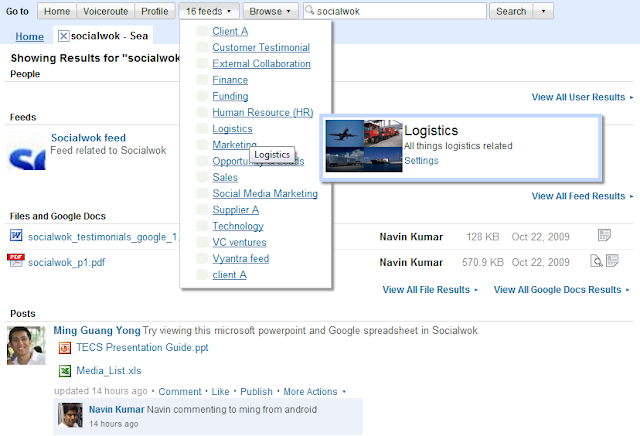
  • Search for posts, people, feeds, files, Google and presented with multi-tab search results


Search Socialwok from right in Gmail. Open various feeds using one-click navigation bar

Wednesday, January 20, 2010

New mobile web version released! Android and iPhone

We just released a new and improved version of our mobile web interface with HTML 5 support for Android and iPhone mobile browsers. Mobile sharing and viewing of pdfs and Google Docs just got easier! We support preview, download and delete of pdf, doc and Google Docs right in your feeds. To try it out, point you mobile web browser to http://app.socialwok.com

New features
  • Added support for "Like" and "Follow"
  • Basic file management for Google Docs: Preview, download or delete files (pdf,doc,ppt,Google Docs) from mobile
  • Mobile login to Google Apps optimized for iPhone and Android

Click photo or here for more screenshots on Socialwok mobile web


Mobile file management for Google Docs: Preview, download or delete files (pdf,doc,Google Docs) from mobile using Google Docs online viewer


Preview and view through supported mobile file types like Google Docs, pdf


Preview and view powerpoint slides from your mobile


Users can click "like" for all updates

Tuesday, January 19, 2010

Brand new Socialwok UI released: Thank you for feedback from users!

We are very excited to announce the release of a brand new Socialwok for 2010! We have listened to your feedback; to simplify and make more intuitive the Socialwok user experience.


The new release includes:
  • Multi-tabular interface - You can open and browse between multiple feeds at the same time without waiting 
  • One click feed navigation menu - One click is all you need to show all the feeds in your network
  • New update counters - You can see in one glance how many new updates there are in each feed

  • Search results by type - Each search generates results in a new tab. You can search based on different types: people, post, feed, file, Google Doc
  • Email sharing for Google Docs and Google Calendar - You can share Google Docs or Google Calendar events using email addresses right from inside the Google user interface

Entering feed email address right in Google Docs

  • File listing - You can view, update and delete files in your domain listed in a table form sorted by date

  • FAQ section - Get the latest suggestions from us on features and answers to commonly asked questions on Socialwok
We will be writing more blog post over the next few weeks highlighting some of the new features and user interface changes in our new release. Look out for later posts.